Planning the night
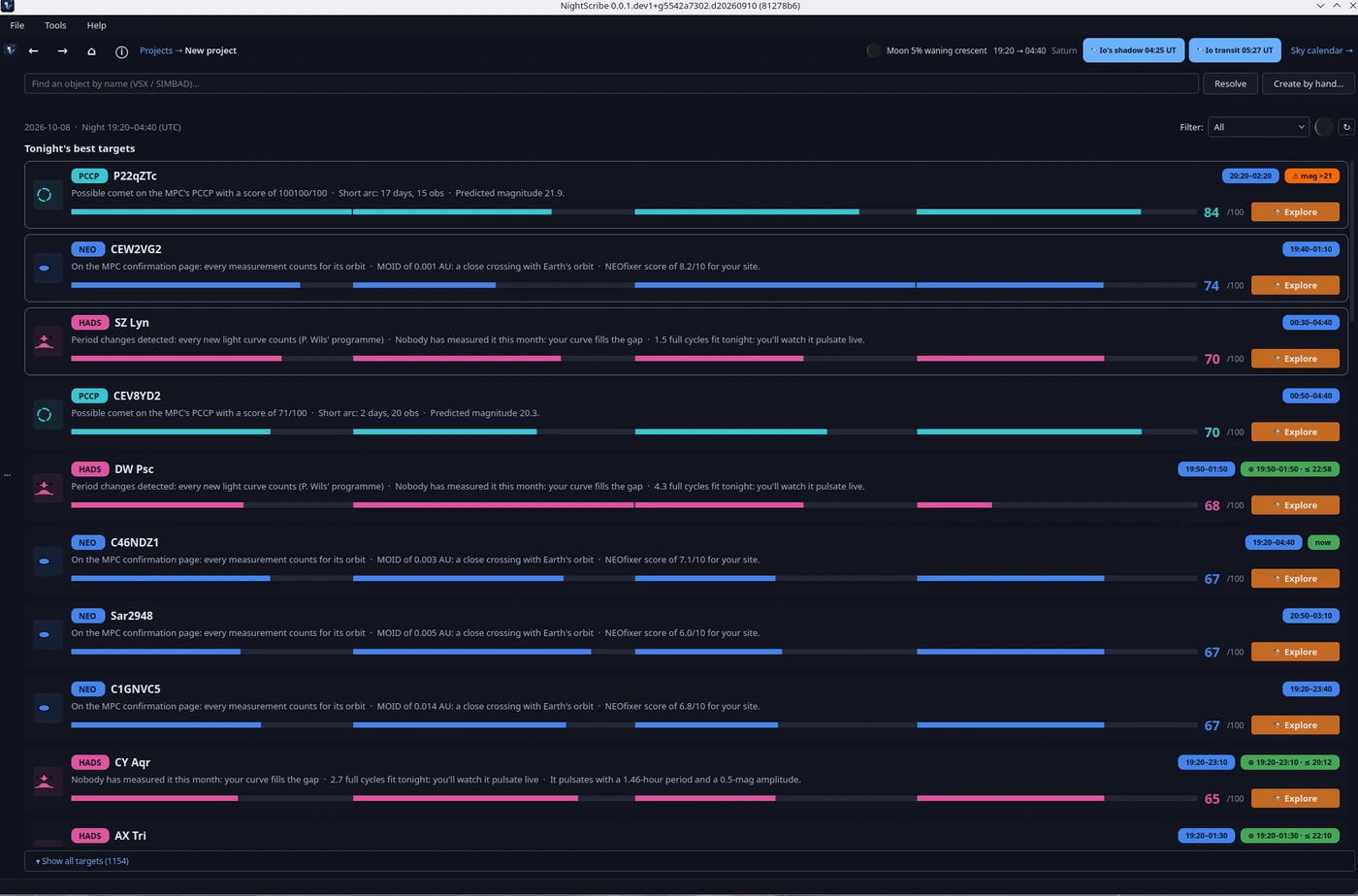
Planning the night in NightScribe is not a separate tab: it is the natural first step of a project's life cycle. The app opens on My projects and, until you select one, the right-hand panel greets you with TONIGHT FROM YOUR OBSERVATORY: the date, the darkness window, the Moon and tonight's planets, over a sky painted with its real phase.
From there, any of these three paths opens the Tonight view:
+ NEW PROJECT, in the header;
Create a project from tonight's targets, in the night panel;
+ New project…, in the project list.
The view answers one concrete question: what is most worth observing tonight, from your site, with your equipment. At the top you have a search bar (Find an object by name (VSX / SIMBAD)…, with Create by hand… for what is not in any catalogue) and, below it, the suggestions.
Tonight's best targets
First, Tonight's best targets: one per kind (a NEO, a comet, a supernova, a transit...) and then the next best, because a varied night is worth more than three identical NEOs. Each card shows:
the score, from 0 to 100;
the "why tonight" sentence: the concrete reason for the suggestion ("On the MPC confirmation page: every measurement counts", "Passes 3.2 lunar distances away on Thursday");
magnitude, maximum altitude and its time (or the transit window), and the estimated cost in telescope minutes when known.
▾ Show all targets expands the full sortable table, with two useful shortcuts: Show covered includes what you already observed or published, and the kind Filter narrows the list to one family. The ↻ button recomputes the targets (in case the sky or your settings changed). Double-click any row to open the object card. Choosing a target, by any of these paths, creates the project and takes you to its card (chapter 03).
Why a score instead of an alphabetical list? Because "visible" is not the same as "valuable". The score blends four things: scientific priority (how much is your measurement needed?), observability (altitude, available hours, Moon, your limiting magnitude), urgency (an unconfirmed NEOCP candidate cannot wait until tomorrow) and outreach hook (a supernova in M51 is also a good story). A target can be perfectly observable and still score low: there are simply better uses of your twilight hour.
What is never hidden
Supernovae, comets and transits beyond your reach drop straight off the list; NEOs and PCCP candidates that are too faint are shown dimmed, never hidden. The difference is deliberate: the magnitude of a freshly discovered NEO is a prediction with large uncertainty, and sometimes the object is a couple of magnitudes brighter than announced. Planning means knowing what is up there, even when tonight you cannot reach it.
Why does the Moon weigh so much? Moonlight does not just raise the sky background: it multiplies the noise of your frames right in the magnitude range of faint targets. A magnitude 20 NEO 30° from the full Moon can be unrecoverable, and the same object, under a new Moon, routine. That is why the score penalises lunar interference instead of pretending it does not exist.
The sky of the coming days
In the header you will see chips with upcoming events (an opposition, a meteor shower, a probable eclipse). Click any of them and the sky calendar opens (also under Tools → Sky calendar…): sixty days of lunar phases, conjunctions, oppositions, meteor showers and Galilean satellite transits over Jupiter, all computed locally for your site.
Why "probable eclipse" and not just "eclipse"? Predicting whether an eclipse will be visible from your site requires fine geometry (contacts, Sun and Moon altitude at each phase). NightScribe computes the orbital geometry and labels honestly: "probable" means the geometry fits and it is worth checking against a detailed ephemeris.
The Sun, as context
The Sky calendar and the solar command summarise current solar activity (spots, flares, wind). It is not decoration: if you do outreach, a large sunspot is a daytime target with the proper filters; and an incoming coronal mass ejection explains (and announces) auroras.
Once you have picked a target, the next step is its project: 03. Projects.